01
Free consultation
We talk about your operation, in person in the Bajío region or by video call everywhere else, and identify what to fix first.
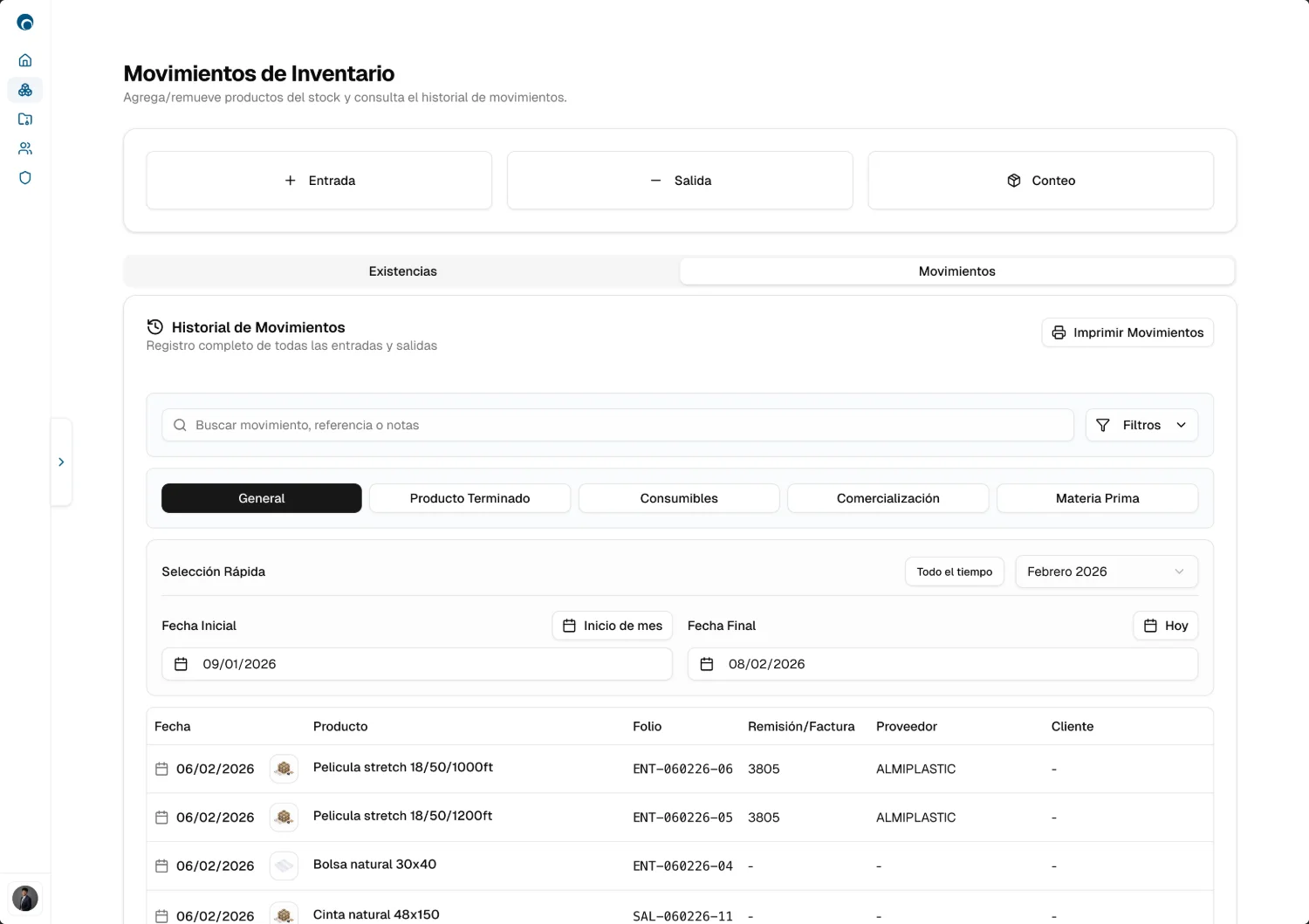
Inventory control by warehouse and branch, with real-time updates while connected and according to the agreed sync process. A stock card (kardex) for every product records each item in, item out and transfer with its reference number and the person responsible. For companies that keep several inventory spreadsheets and none of them match.
Clients and Nightly projects












The problem
If any of these sound familiar, it’s worth a conversation. The consultation is free.
The physical count in the warehouse never matches what the spreadsheet says.
Stock goes out with no reference number and no one responsible.
You only find out something ran out when you need it.
You know the product is there, but not which batch it belongs to or which one expires first.
You know stock is missing, but not whether it was waste, a data-entry mistake or stock that left without being logged.
For the physical count, the warehouse shuts down and someone reconciles count sheets against the spreadsheet.
What’s included
We build your inventory control around how your materials actually move, not the other way around. In Irapuato, León, Silao and the rest of the Bajío region we visit your warehouse to see it in person; anywhere else in Mexico, we review it by video call.
Raw materials, consumables and finished goods in every warehouse and branch, with transfers between them. Management sees the total according to the agreed sync process; an offline entry remains pending until it syncs.
Every item in, item out and transfer with its reference number, date, supplier or customer and person responsible, plus the balance left after each movement.
You know which batch each order came from and what’s about to expire, so you sell what expires first.
Scan the barcode with a phone or a handheld scanner and the movement is logged on the spot, without typing codes.
Each product has its minimum, and the system warns you when anything drops below it, before you run out.
Movements, stock levels, usage and turnover in Excel or PDF. Warehouse, purchasing and management each see what they need.
In detail
Commercial software can also handle batches, locations and multiple warehouses. We check its configuration first and build the rules or connections it does not cover. These capabilities are selected according to what you stock:
| What you need to track | How the system handles it |
|---|---|
| Raw materials that get transformed | We define how to record material consumed by each order and the receipt of finished goods. The Polymer for Sumiplas case shows inventory connected to production. |
| Batches and expiry dates | Every receipt is logged with its batch and expiry date, and when you pick an order, what expires first goes out first. |
| Serial numbers | Each unit keeps its number from receiving to sale, which helps with warranties and returns. |
| Locations | Warehouse, aisle and shelf for every product, so whoever picks the order finds it without asking. |
| Transfers between branches | Every shipment leaves with a reference number and the receiving branch confirms what arrived; if something is missing, you know which transfer it was. |
| Shrinkage and waste | Logged with a reason and the person responsible, so you see how much is lost by product, area or month. |
| Cycle counts | You count one part of the warehouse each week without shutting it down, and the system compares what was counted with what’s on record. Our inventory control guide explains how to organize them. |
| Barcodes and labels | Print labels for products and locations, and log every movement by scanning. |
In detail
Use a real product you buy and sell, its units, an order and a transfer. These tests are agreed around your operation; they are not features included in every module or results achieved by a client.
If differences appear when shipping between branches, start with stock, reservations and partial receipts between warehouses. If the problem comes from opening data, follow the catalog review and cutover for migration from Excel. For lot-tracked stock, add the expiry, FEFO removal and blocked-stock tests. Each guide has an invented exercise with quantities and criteria for accepting or holding an operation.
| Test with your product | What should be clear |
|---|---|
| Buy a box and sell individual units | Conversion, rounding and cost follow a defined rule; the supplier’s unit does not accidentally change the balance. |
| Reserve an order before shipping it | Physical stock, reserved quantity and available-to-sell stock are distinct. Cancellation releases the reservation without inventing a receipt. |
| Send to another branch and receive only part | Shipped, received and outstanding quantities stay separate. Goods in transit are not available in both warehouses. |
| Return a unit or withdraw a batch | It links to the original movement, with a decision to return it to sale, hold it for inspection or record it as waste. |
| Enter a movement twice or find a count difference | A duplicate does not inflate stock; an authorized adjustment keeps its reason, responsible person and history. |
Before importing spreadsheets, we agree on unique product codes, units and locations, the cutoff date, retained history and who validates opening balances against the physical count. Importing a file does not fix the errors it already contained. Bring a sample without confidential information to the consultation; the scope worksheet helps organize it.
Prepare that review with the T00–T09 transfer exercise or the M01–M08 migration exercise, alongside the test instructions. These are synthetic records for discussing rules and exceptions with your vendor, not Sumiplas data or import files ready for every system.
To compare two vendors, download the inventory demo scorecard (CSV). Ask both to use the same synthetic data and follow the instructions for T02 (partial receipt), T03 (retrying REC-001) and T05 (attempting to reserve 80 units with 77 available). Record the plan, version and environment of each demo and flag any difference from the quoted plan. Keep the transaction reference and export that document each result. Mark Pass or Fail based on the evidence, or Pending demonstration if it is missing.
Ask for a quote that confirms what the offered plan covers, what requires configuration or development, and the deliverables and cost of each stage. Enter the confirmed costs in the 3-year cost calculator.
Commercial software can include batches, unit conversions and multiple warehouses. First we test whether configuration covers these movements; custom development is justified by rules or connections still missing. Review our inventory and production work in Polymer for Sumiplas; Ventrack is our own POS product. Compare investment and recurring costs in the inventory pricing guide.
Pricing
Starting-price references. The exact price comes in writing within 1 business day of the free consultation, and you pay in stages, not for the whole system up front.
See all pricingWork out the 3-year cost against subscription software
Custom development
These rights apply to the code we develop specifically for your custom project.
The source code we develop specifically for your company belongs to you, just like your data. Your custom software has no user limit or per-user charge from Nightly. Each person signs in with their own permissions.
Development is paid in stages. Hosting, maintenance, support and third-party services are agreed separately in the proposal.
Code delivery is part of the project. The proposal defines how it is delivered and which documentation and access are included. Nightly products and third-party components and platforms retain their own licences and terms. See delivery terms.
How we work
No commitment and no jargon. You get a written proposal within 1 business day of the consultation.
01
We talk about your operation, in person in the Bajío region or by video call everywhere else, and identify what to fix first.
02
You get a written proposal within 1 business day of the consultation, with the scope, price and timeline split into stages.
03
We build in stages, you review progress at every delivery and we keep improving the system with you.
Projects
We don’t publish these clients’ names.
In writing
That’s what our terms say · How we work
We fix, at no cost, anything that doesn’t work as agreed and that you report within 60 calendar days of each delivery.
You can ask us for a full export at any time, including when the project ends.
We use what you share about your business only for your project and, if you need it, we sign a confidentiality agreement before we start.
If you ask for something outside the proposal, we first tell you in writing how it changes the price and dates, and we only do it if you approve.
When each stage arrives, you review it and tell us anything that doesn’t match what we agreed. We fix that at no cost.
Let us know in writing and you pay only for the work done up to that day.
What business owners ask us before getting started.
A simple inventory control system can start from about $5,000 MXN. With several warehouses or branches, barcodes and reports, from about $25,000 MXN, and connected to sales and production as a complete system, from about $45,000 MXN, paid in stages. You get the exact price in writing within 1 business day of the free consultation. We compare inventory software and a custom system in how much an inventory system costs.
It’s a system that records every item in, item out and transfer of your goods by warehouse and by branch, so you know what you have and where without counting by hand or reconciling several Excel files. “Custom” means it follows your rules: how you handle batches and expiry dates, which units you buy and sell in, and how you fill orders. If you’d like to sort out the process first, read how to control your company’s inventory.
Yes. The stock card, called a kardex in Mexico, is each product’s history: every item in, item out and transfer with its date, reference number and person responsible, and how many units are left after each movement. The system builds it on its own with every movement, so nobody keeps it by hand or in a separate spreadsheet, and you export it to Excel or PDF whenever your accountant asks. Your company’s costing method, such as average cost or FIFO (first in, first out), is set during the consultation.
Yes. You track inventory by branch and by warehouse: each one with its own stock, items in and out, and transfers. Management sees the total according to the agreed sync process. If offline capture is included, those movements remain pending until they sync; we agree how they are distinguished from confirmed movements and reconciled when the connection returns.
Yes. We define which of these records your operation needs and test how they carry through receipts, transfers, transformations and picking. If a supplier reports a defective batch, you should be able to look up which orders and customers received it. If you handle expiry dates, we can include earliest-expiry selection and a rule to block expired goods; those rules go in the written scope.
A web system needs a connection, like any website. If the signal is unreliable in your warehouse or at your register, it can be designed to keep logging without internet and sync when the connection returns, the way Ventrack, our point of sale, does. We decide this in the consultation, based on where it will be used.
If an off-the-shelf program works for you, we’ll tell you in the consultation. Transformations, waste, transfers and stock deductions are also available in commercial software. Custom work makes sense when, after testing the available configuration and connections, your rules still do not fit or require repeated data entry. If you’re comparing it with Odoo, Bind, CONTPAQi or Aspel, read Bind, CONTPAQi, Aspel or custom software and Odoo or custom software.
Yes. We move your information into the system so you don’t start from scratch, and you can keep exporting reports to Excel or PDF.
Yes. We define whether a sale or order reserves stock or records consumption, and how cancellations or returns are corrected without duplicate movements. Review our inventory and production work in Polymer for Sumiplas.
Yes, within what your version allows. You keep your accounting and invoices (CFDI) in the program you already use, and we connect your inventory to it so stock in, stock out and stock levels aren’t entered twice. If your program’s own inventory already does the job, you keep it. We check your version and plan before quoting.
Yes. Ventrack is our ready-made point of sale for retailers: it rings up sales, deducts each branch’s stock with every sale and keeps working when the internet goes down; when the connection comes back, everything syncs on its own. It can connect to your online store so stock is the same at the counter and online. It costs $990 MXN a month, with setup and training included, and you can cancel anytime; plans are at ventrack.app/planes. If you need something Ventrack doesn’t do, we build it custom from about $5,000 MXN. You can see it working in the Ventrack case study, and our retail software page explains how to run registers, branches and an online store on the same stock.
Because you don’t pay for it all at once. The project is split into stages, each with its price and date in writing, and the first one solves what’s most urgent, such as stock by warehouse, so your team uses it from the day it’s delivered. You have 5 business days to review each stage, and anything that doesn’t match what we agreed we fix at no cost. If you decide not to continue, you can end whenever you want and pay only for the work done.
A specific adjustment may take hours; a small module, about a week once the necessary data and access are ready. Migration, integrations and testing for a complete system require a staged schedule. A large system, for example with several branches connected to sales and production, is delivered in stages, each with its date in writing, and what each stage brings is in use from the day it’s delivered.
We fix, at no cost, any defects you report within 60 calendar days of the delivery of each stage. And your inventory data is always yours: you can export stock levels, movements and history whenever you like.
The source code we develop specifically for your company belongs to you, just like your data. Your custom software has no user limit or per-user charge from Nightly. Each person signs in with their own permissions. Development is paid in stages. Hosting, maintenance, support and third-party services are agreed separately in the proposal. Code delivery is part of the project. The proposal defines how it is delivered and which documentation and access are included. Nightly products and third-party components and platforms retain their own licences and terms.
Review service scope, prices and examples for your city. We work remotely from Irapuato and review your operational requirements before quoting.
We’ll tell you what to fix first and what it would cost. We reply the same business day.